> ## Documentation Index
> Fetch the complete documentation index at: https://docs.corvoai.io/llms.txt
> Use this file to discover all available pages before exploring further.
# Discord conversations
> Mention Corvo in a channel or continue an investigation in its thread.
After [binding a Discord channel](/integrations/discord), you can ask questions in channels on that server and follow up on individual alerts. The same Corvo bot handles both.
 ## Ask in a channel
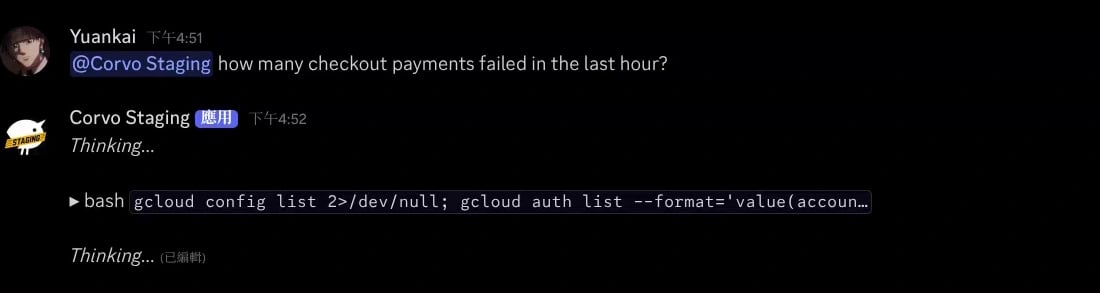
Mention Corvo together with your question in any channel on the connected server where the bot has access. It replies in that channel. Each channel has its own conversation history. A message without a mention, outside an investigation thread, does not start a task.
For example: “@Corvo how many checkout payments failed in the last hour?” Give the service and time range so the agent can look up the right evidence.
## Ask in a channel
Mention Corvo together with your question in any channel on the connected server where the bot has access. It replies in that channel. Each channel has its own conversation history. A message without a mention, outside an investigation thread, does not start a task.
For example: “@Corvo how many checkout payments failed in the last hour?” Give the service and time range so the agent can look up the right evidence.
 ## Continue an investigation
1. Find the investigation alert in the bound alert channel.
2. Use Discord's **Reply** action on that alert and send your question.
3. Corvo opens a thread for the alert. Continue the discussion inside it; you do not need to mention the bot on each reply.
This thread uses the investigation's conversation, including its prior work. A general channel mention uses the channel's separate history. If Corvo says the alert is still being assigned, send your question again after the investigation is available. Older alerts from before investigations are read-only; ask about them in a new channel conversation.
## Stop or redirect work
Use `/stop` in the channel or thread whose active turn you want to stop. Use `/steer` and fill in **instruction** to change what Corvo should do from its next step, such as “Check the deployed revision before editing.” Normal follow-up messages can wait while a turn is running.
This documentation is built and hosted on [Mintlify](https://mintlify.com), a developer documentation platform.
## Continue an investigation
1. Find the investigation alert in the bound alert channel.
2. Use Discord's **Reply** action on that alert and send your question.
3. Corvo opens a thread for the alert. Continue the discussion inside it; you do not need to mention the bot on each reply.
This thread uses the investigation's conversation, including its prior work. A general channel mention uses the channel's separate history. If Corvo says the alert is still being assigned, send your question again after the investigation is available. Older alerts from before investigations are read-only; ask about them in a new channel conversation.
## Stop or redirect work
Use `/stop` in the channel or thread whose active turn you want to stop. Use `/steer` and fill in **instruction** to change what Corvo should do from its next step, such as “Check the deployed revision before editing.” Normal follow-up messages can wait while a turn is running.
This documentation is built and hosted on [Mintlify](https://mintlify.com), a developer documentation platform.