

Ask the Agent bot
In the bound DM, send your message directly. In a bound group, mention the Agent bot together with your request, or reply to one of its messages. Ordinary group messages do not start a task. The group shares one conversation, so include enough context for teammates to follow. For example, mention the Agent bot and ask: “Check checkout errors in the last 30 minutes. Which error is happening most often?” Include the workload, time range, and symptom. Corvo uses the workspace’s connected sources, repositories, tools, and permissions.
Questions stay with the Agent bot; alert notifications link to the investigation.
Follow an alert from the Notify bot
A notification identifies the affected service and error, with View logs and Open in Corvo links. It can be updated as the investigation progresses.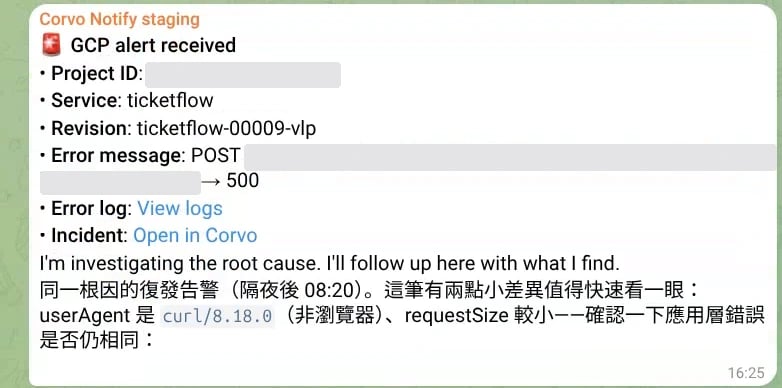
An investigation notification in Telegram. The project ID and service URL are hidden.
Control the current task
In a group containing both bots, address control commands to the Agent bot, for example
/stop@your_agent_bot and /steer@your_agent_bot Check the logs first. Replace the username with the bot connected to your workspace. See Daily reports for scheduled delivery.