


The two connections serve different actions.
1. Connect the Agent bot

Choose DM or Group for conversations with the Agent bot.
- Select DM. The dialog opens with Direct message selected.
- Select Open DM in Telegram, or scan the QR code.
- Select Start in Telegram to send the binding token to the Agent bot.
- Return to Corvo. The card should show DM CONNECTED.
- Select Group, then Add bot to group in the dialog.
- Choose the group in Telegram and complete the add-bot flow. If the bot is already there, copy the
/bind@…command shown by Corvo and send it in that group. - Wait for the bot’s confirmation. Return to Corvo and check for GROUP CONNECTED.
2. Connect the Notify bot
After the Agent bot is connected, the card offers Connect alerts bot.
GROUP CONNECTED refers to the Agent bot. Connect alerts bot starts the second connection.
- Select Connect alerts bot.
- Choose Direct message or Group chat for investigation notifications.
- In a DM, select Open alerts bot in Telegram, then Start. For a group, select Add alerts bot to group, or use the Notify bot’s own binding command from this dialog.
- Return to Corvo and check for ALERTS BOT (DM) or ALERTS GROUP (group), alongside the Agent bot’s connection status.
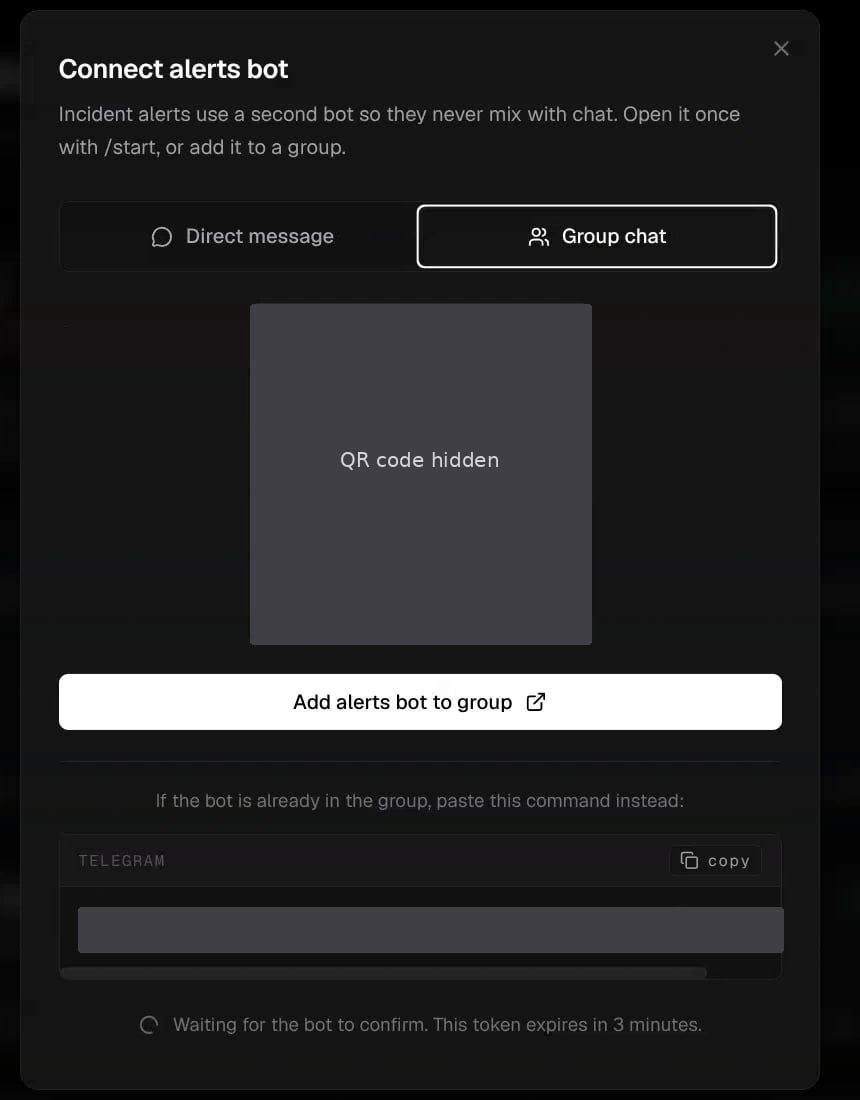
The Notify bot has its own link and binding command. The QR code and token are hidden in this example.

Both bots are connected: GROUP CONNECTED for conversations, ALERTS GROUP for notifications.